


[Search & Blur] The Boom Mic Was in the Shot. Here's How to Find It Fast.
![[Search & Blur] The Boom Mic Was in the Shot. Here's How to Find It Fast.](https://storage.ghost.io/c/1b/90/1b90bca5-caef-43b3-90d6-4b197d90c045/content/images/size/w960/2026/08/------------------------------------30-.png)
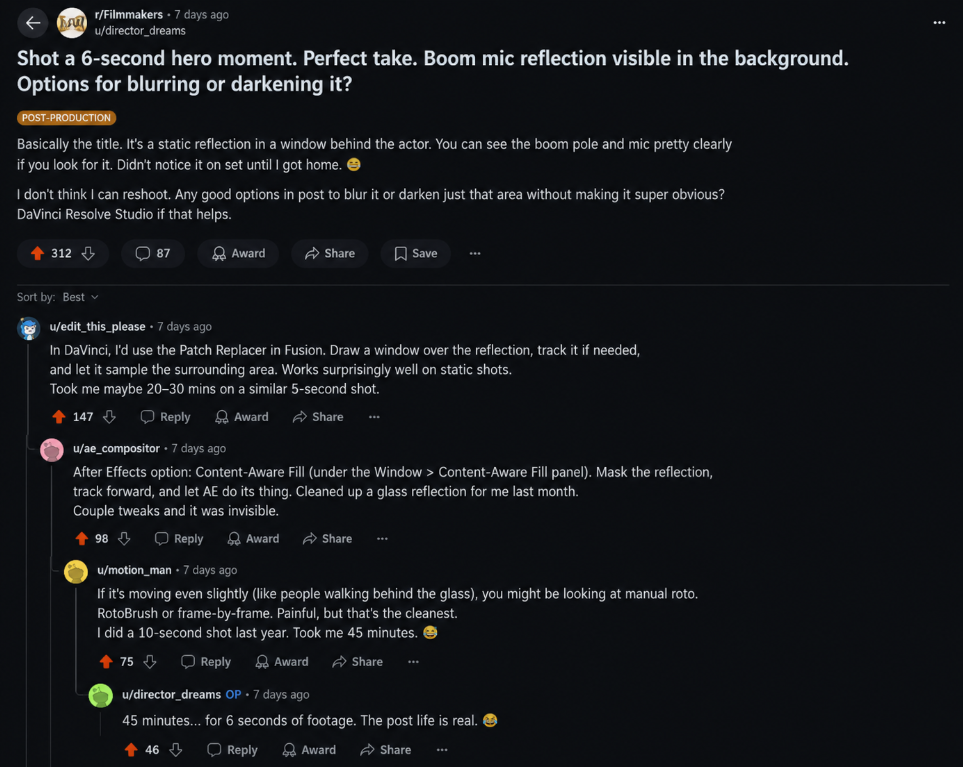
A filmmaker posted this on Reddit last week:
"Shot a 6-second hero moment. Perfect take. Boom mic reflection visible in the background. Options for blurring or darkening it?"
The replies were helpful. Patch tool in DaVinci. Content-aware fill in After Effects. Manual roto if it's moving.
One person said it took them 45 minutes on a similar shot.
45 minutes. For 6 seconds of footage.
The problem isn't the blur. It's finding what to blur.
Every editor has a version of this:
- A crew member's reflection in a window
- A stranger who walked into frame with no release form
- A license plate in the background of a shot
- A brand logo you can't legally show
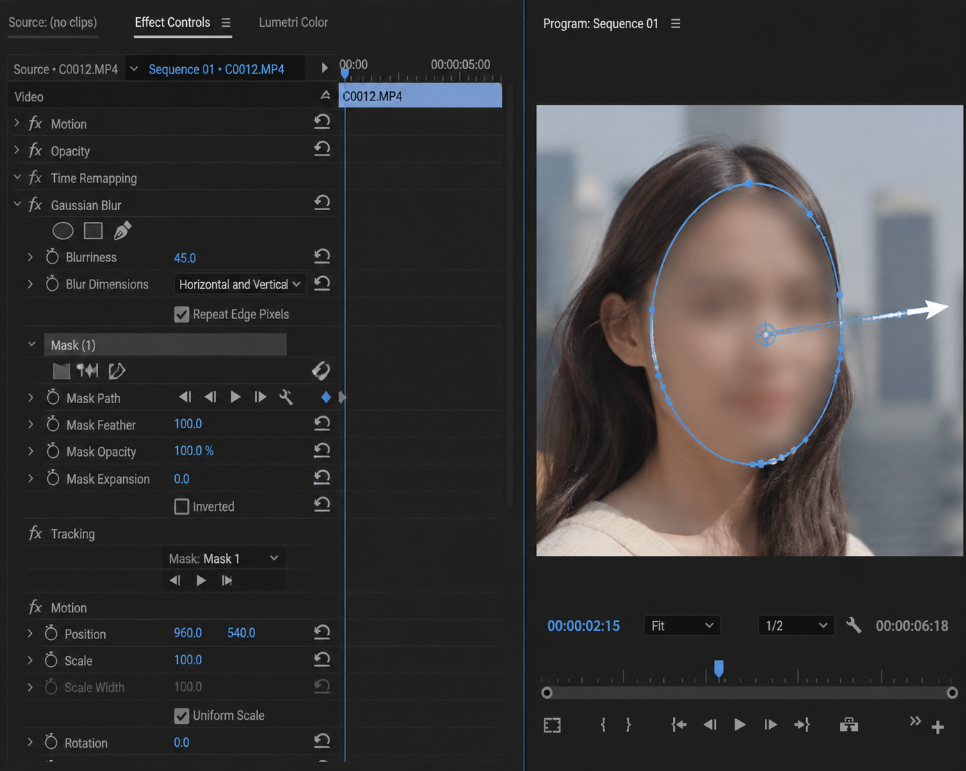
Applying the blur is the easy part. Premiere has Gaussian Blur and Mosaic effects with built-in mask tracking. You drag the effect onto a clip, draw a mask, and click the track-forward arrow. Premiere follows the object automatically. DaVinci has the same. After Effects goes further with content-aware fill.
Those tools work fine. So why doesn't Premiere just find the problem for you?
Because mask tracking only starts after you've already found it. You have to scrub to the frame, draw the mask yourself, and then Premiere follows it. The tracking is automatic. The finding is entirely manual.
There's a deeper reason too: Premiere doesn't index what's inside your footage. Your project panel knows filenames, durations, and codecs. It doesn't know that a boom mic appears at 00:04:12. Scene Edit Detection can find cuts, but a cut is a technical event. "There's crew equipment in frame" is a semantic judgment, and nothing in Premiere is built to make it.
So the hard part stays where it always was: scrubbing through an hour of footage to find which frames have the problem. That's where the time goes.
What if you could just search for it?
Instead of watching everything, you type what you're looking for:
- "frames with crew equipment visible"
- "faces in the background"
- "visible brand logos"
You get a list of timestamps with thumbnails. You confirm which ones need fixing, then blur them in whatever tool you already use.
The finding is automatic. The fixing stays yours.
The Big Difference: Standard AI Blur Tools vs. Heimdex
Most AI mosaic tools on the market today are pretty basic. They can barely spot anything beyond a clearly lit, front-facing human face.
When it comes to tricky in-frame elements—like a boom mic reflecting off a shiny surface or a split-second glimpse of an unapproved brand logo—traditional AI completely misses them. That’s exactly why Heimdex is in a whole different league.
- Face Detection vs. Natural Language Search & IndexingHeimdex goes way beyond basic face recognition. It actually understands the full context and objects in every frame. You can search your footage using everyday language—like "scenes with crew equipment in frame"—and jump straight to the exact moment.
- Basic Masking vs. Automated Privacy Blurring & ComplianceIt doesn't stop at just finding things. Heimdex automatically identifies sensitive personal information—like license plates, ID numbers, and third-party faces—and blurs them instantly. It also flags explicit content, violence, or unapproved logos with clear captions, letting you review flagged scenes and apply automated blurs with a single click to stay compliant.
- Cloud Uploads vs. 100% On-Device SecurityYour video footage never leaves your machine. Everything runs 100% locally on your computer, so you can work on NDA-protected projects, unreleased cuts, or confidential corporate videos without worrying about data leaks.
The short version
"Just fix it in post" sounds fast when you say it on set.
It's not fast. It's 45 minutes of scrubbing followed by 5 minutes of actual blurring.
Finding it in 4 seconds instead is the part that's new.
👉 [Request a free consultation now and claim your benefitsheimdex.co