


Can Claude + Premiere Pro MCP Search Your Footage? What It Actually Does at Scale
You've probably seen the demos: someone types a sentence into Claude and their Premiere Pro timeline rearranges itself. It's real, and for a specific set of tasks it's genuinely useful.
But most articles either oversell it or get one important detail wrong. Here's the honest version — including what changed recently, and the wall you still hit the moment you're working with a real footage archive.
What is a Premiere Pro MCP, in plain terms?
MCP (Model Context Protocol) is a bridge between Claude and another app. Instead of copy-pasting instructions back and forth, Claude can drive Premiere Pro directly — think of it as a remote control for your editing timeline.
There's no single official product. There's a small ecosystem of open-source MCP servers — toonyai's premiere-mcp, BuzzRolls Studio, and others — that each expose hundreds of Premiere operations as tools an AI agent can call. You describe what you want; the agent executes it as native timeline operations you can still undo by hand.
What Claude + Premiere Pro MCP is genuinely good at
This is where the time savings are real. Current Premiere MCP servers ship dozens of these as native, callable commands. Tasks that used to take 20 clicks now take one sentence:
- "Add a cross dissolve between all clips on V1"
- "Export this sequence as 1080p MP4"
- "Adjust all audio tracks to -12 dB"
- "Generate captions for this sequence"
- "Ripple-delete the gaps and tighten the dialogue"
If you've ever spent 45 minutes doing the same operation across 30 clips, this is the fix. For repetitive, mechanical timeline work, an MCP-driven agent is a real accelerator.
Can Claude search inside my footage through MCP?
Here's the part most older articles get wrong. The common claim is: "MCP controls your timeline but can't see inside your footage." That used to be true. It isn't anymore.
Newer Premiere MCP servers have started bolting on search. Some transcribe your audio with Whisper and run sampled frames through Claude Vision, then jump to the matching moment. Others scan a media folder, generate an edit decision list from a script, and assemble a rough cut.
So the honest answer is: yes, MCP + Vision can now find clips — within limits. The interesting question isn't whether it works in a demo. It's what happens when you point it at a real archive.
Where footage search through MCP breaks down
The moment you move from a 10-clip demo to a library you've built up over months or years, three structural problems show up:
1. Cost scales with every search. Vision-based search analyzes frames per request. On a handful of clips that's fine. Across hundreds of hours of footage, you're paying per-frame API costs every time you look for something — and you look for things constantly.
2. Speed degrades as the library grows. There's no persistent understanding of your footage. Each query re-analyzes material from scratch, so search gets slower exactly as your archive gets bigger and more valuable.
3. Visual-only queries stay weak. Transcript-based search can't find what nobody said out loud. "Every shot where the host holds the product close to the camera" has no spoken cue — and sampled frames miss the moments between samples.
And the one that matters most for professional teams:
4. Your footage leaves the building. To analyze frames, these servers send them to an external API for processing. For broadcast, agency, and enterprise editors handling client material, unreleased content, or footage with people who haven't signed off, uploading raw footage to a third-party cloud isn't a minor inconvenience — it's a compliance non-starter.
MCP + Vision vs. a dedicated footage index
| MCP + Claude Vision | Dedicated footage index | |
|---|---|---|
| How search works | Transcribes audio + samples frames per request | Indexes the whole library once |
| Cost model | Per-frame / per-request API cost | One-time indexing, then free search |
| Speed on large archives | Slows as the library grows | Seconds, regardless of size |
| Visual-only queries | Weak (relies on speech + sampled frames) | Built for it |
| Where footage lives | Frames sent to an external API | Stays on-prem — no upload |
| Best for | Demos and small projects | Real archives and production teams |
Heimdex is built as exactly that dedicated index. Its Vector-Native architecture embeds your footage once, on-premises, into searchable vectors — so a query against a 10-hour archive returns just as fast as one against a 10-minute clip, with nothing ever leaving your storage.
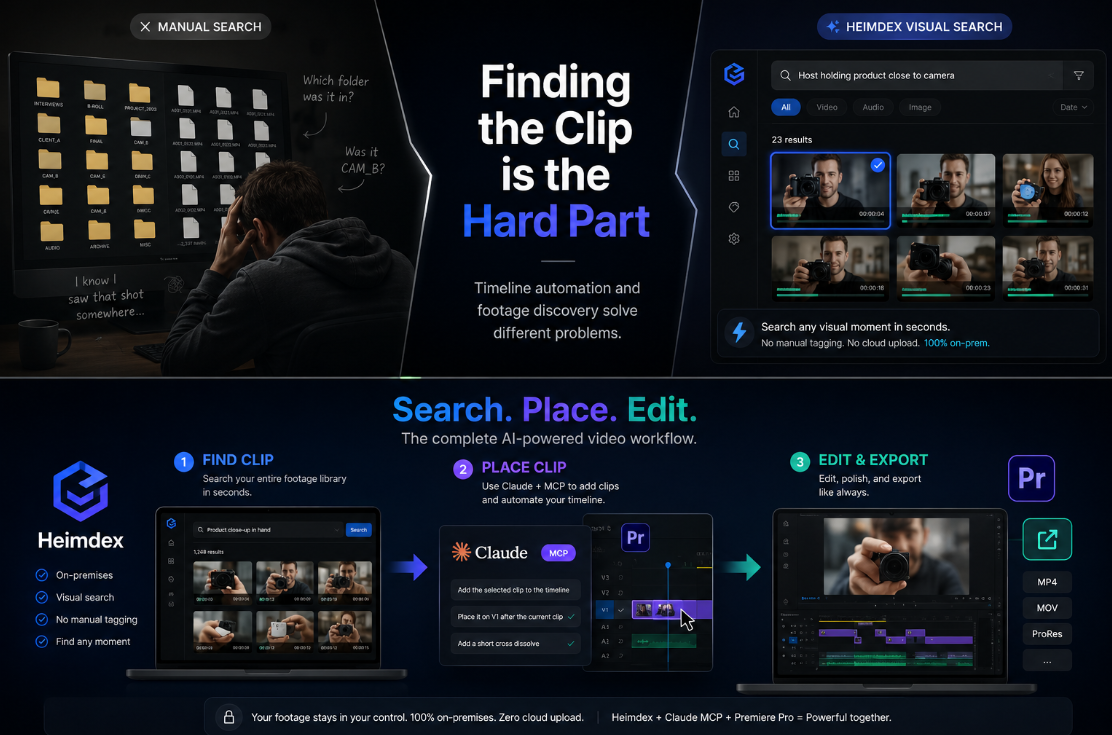
Why finding the clip is the hard part
Step back and look at the actual workflow:
- Search for the right clip — historically the hardest step
- Pull it into the timeline — MCP is great here
- Edit, trim, export — MCP is great here
Step 1 is where most production time goes. Scrubbing through folders, rewatching footage you half-remember, asking a colleague where that one shot lives.
The deeper reason it's hard: the visual information inside your footage doesn't exist in a searchable form. A file named INTERVIEW_FINAL_v3.mp4 tells you nothing about which 4 seconds show the product close-up. Tags capture a fraction of what's on screen, and they only exist if someone took the time to write them. The bottleneck isn't that searching is tedious — it's that what you're searching for was never turned into something searchable in the first place.
That's a different problem from timeline automation, and it needs a different tool.
Frequently asked questions
Can Claude edit my Premiere Pro timeline?
Yes — through an MCP server or native plugin, Claude can apply transitions, trim, ripple-edit, level audio, generate captions, and export, all as native, undoable operations.
Can Premiere Pro MCP search my footage library?
Partly. Newer servers add transcript- and Vision-based search, but cost, speed, visual-query accuracy, and cloud-upload requirements limit it to small projects rather than large archives.
Is my footage uploaded to the cloud when I use an MCP server?
With Vision-based servers, frames are sent to an external API for analysis. If your work involves client or compliance-sensitive material, check this before adopting any tool — and prefer on-premises options.
What's the difference between timeline automation and footage discovery?
Timeline automation moves and edits clips you've already chosen. Footage discovery finds the right clip in the first place. They're separate problems; the best workflows use a tool for each.
Bottom line
Claude + Premiere Pro MCP is a real time-saver for editing automation, and footage search through Vision is no longer impossible — it just doesn't survive contact with a large archive. The economics, the speed, and the cloud-upload requirement all break down at exactly the scale where finding clips matters most.
For teams with serious footage libraries, you need both: something to find the clip, and something to place it.
Heimdex indexes your footage library on-premises, so you can find any scene in seconds — no cloud upload, no manual tagging — then drop it straight into your Premiere timeline. → heimdex.co
Sources
- Model Context Protocol — official documentation
- toonyai/premiere-mcp — Whisper transcription + Claude Vision search for Premiere Pro
- ayushozha/AdobePremiereProMCP — script-to-EDL rough cut assembly
- BuzzRolls Studio — Premiere Pro MCP server and native plugin
