


AI Auto-Blurring: The Ultimate Post-Production Time-Saver (Pro Editing Tips ①)

Hey creators,
Great to finally connect! I’m Yang Editor from HEIMDEX. 😊
If you’ve been editing for a minute, you know there are certain tasks that make you question your career choices. For me, that’s always been face blurring and rotoscoping. Today, I’m going to show you how to completely eliminate that mind-numbing grunt work from your pipeline.
The Post-Production Nightmare: Pedestrian Rotoscoping
Anyone who has ever had to clear a background knows the absolute hell of removing or blurring random pedestrians. Trying to mask out even a single person passing through a shot is a tedious, multi-step chore:
Draw the mask $\rightarrow$ Feather the edges $\rightarrow$ Track the frames $\rightarrow$ Fix the mask when it flies off because the subject moved too fast. And then repeat that for every single person in the frame.
I recently talked to a post-production team at a broadcast studio. They spent two full days and nights doing nothing but blurring faces for a one-hour documentary delivery. The camera did a few simple pans, but because it captured dozens of people in the background, they had to mask everything by hand. They were on the verge of a total breakdown the night before delivery.
It’s Not Just Faces—Compliance is a Minefield
The real danger of blurring isn’t the initial edit; it’s what happens during QC (Quality Control). When a client or legal team reviews the footage, the list of elements that need to be censored or blurred skyrockets:
- PII (Personally Identifiable Information): ID badges, business cards, license plates, or confidential documents on background monitors.
- Compliance & Standards (S&P): Explicit, violent, or sensitive imagery that violates broadcasting or platform guidelines.
- Brand Protection: Unlicensed logos or trademarked products that cause product placement (PPL) conflicts must be blacked out or blurred.
Manually hunting down these elements frame-by-frame and masking them out builds up exponentially as your timeline gets longer and your scenes get more crowded.
Premiere Pro’s "Auto-Blur": Is It Actually Automatic?
Let's be real: Premiere’s built-in auto-tracking isn’t fully automatic. It’s more like "glorified manual labor with an AI assist."
To apply a blur, you still have to manually click and draw a mask around the target object first. The AI only helps track that specific mask over time. What if your scene has 20 or 30 objects to cover? You have to repeat that manual masking process 30 times. The more subjects you have, the more you realize it's just the same old manual labor with a modern label.
Switch to a Fully Automated Workflow
This is exactly why pro editors and post-production houses are migrating to HEIMDEX. Instead of waiting for you to draw a mask, the AI analyzes the entire video file in one go.
1) Zero-Click "Auto-Detection"
You don't need to specify a target area. Whether there are dozens of background extras or a tiny license plate hidden in the corner of the frame, the AI automatically detects sensitive data across the entire frame and applies the blur instantly. All you have to do is upload the footage.
2) Context-Aware Compliance Analysis
Where HEIMDEX truly shines is its ability to understand the context of a scene rather than just identifying objects. Since every network and platform has different compliance standards, HEIMDEX automatically flags potentially sensitive or violent imagery, as well as brand logos. It then drops "Tag" guides directly onto your timeline so you can rapidly review, approve, or bypass them.
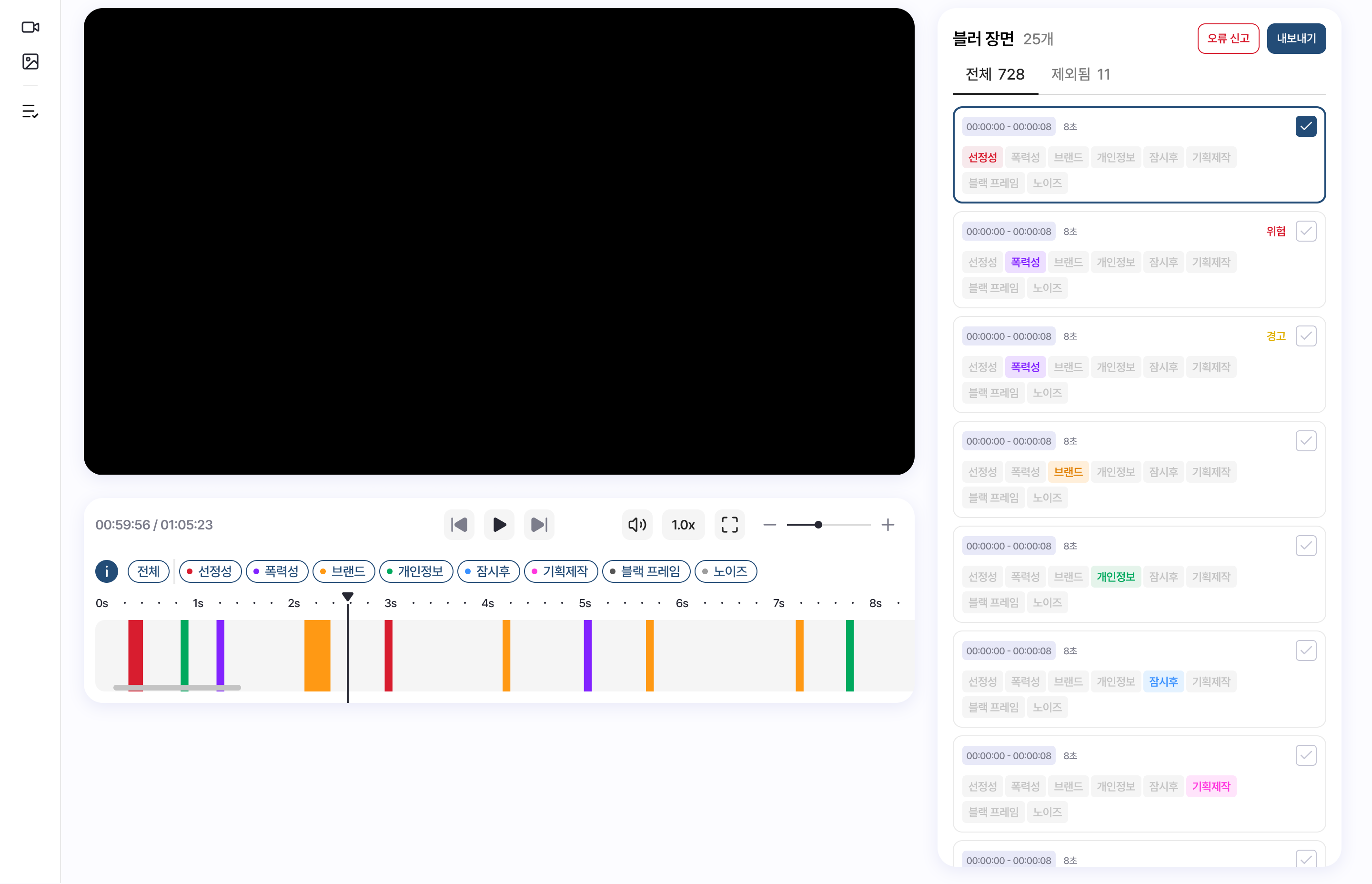
Head-to-Head: Premiere Pro vs. HEIMDEX
| Feature | Premiere Pro (Built-in Automation) | HEIMDEX |
| Workflow | Semi-Automatic (Manual masking required before tracking) | Fully Automatic (Handles everything from detection to blurring) |
| Multi-Object Handling | Must repeat masks manually for every single face/vehicle | Automatically identifies dozens of subjects simultaneously |
| Detection Scope | Limited to user-specified areas | Faces, PII (IDs, license plates), logos, and compliance scenes |
| Contextual Awareness | None (Simple shape/pixel tracking) | Advanced (Flags compliance, explicit content, and logos via timeline tags) |
| Security & Environment | External cloud processing (Bandwidth & security risks) | Local On-Premises (Isolated network with zero external data leaks) |
The Industry Landscape Has Shifted
According to an Adobe report, 87% of creators using Creative AI say it has accelerated their business or audience growth, and 75% describe AI as deeply integrated or essential to their day-to-day workflow.
Editing is no longer a test of how fast your fingers can move across a keyboard—it’s about how smartly you leverage AI to optimize your pipeline.
Reclaim Your Creative Value
Clients want deliverables that are faster, more precise, and highly secure. Why waste hours on repetitive, low-value blurring tasks? Let HEIMDEX handle the grunt work so you can dedicate your energy to what actually matters: the creative direction and story.
❓ Frequently Asked Questions (FAQ)
Q1. Does HEIMDEX integrate with Premiere Pro?
Yes. It integrates seamlessly into your existing NLE environment. Blurs are generated as cut-up layers placed directly over your sequences. If you don't need a specific blur, you can simply delete that section of the blur layer. It’s incredibly straightforward.
Q2. Does it run locally, or is it strictly cloud-based?
HEIMDEX supports both local on-premise deployment and cloud environments. You don't have to deal with tedious upload times—you can process everything locally on your own machine.
Q3. Is the AI auto-blur 100% perfect? Are there any missed spots?
AI detection accuracy can vary depending on lighting, extreme camera angles, and footage resolution. Because of this, we recommend a workflow where the AI handles the heavy lifting first, followed by a quick human QC pass.
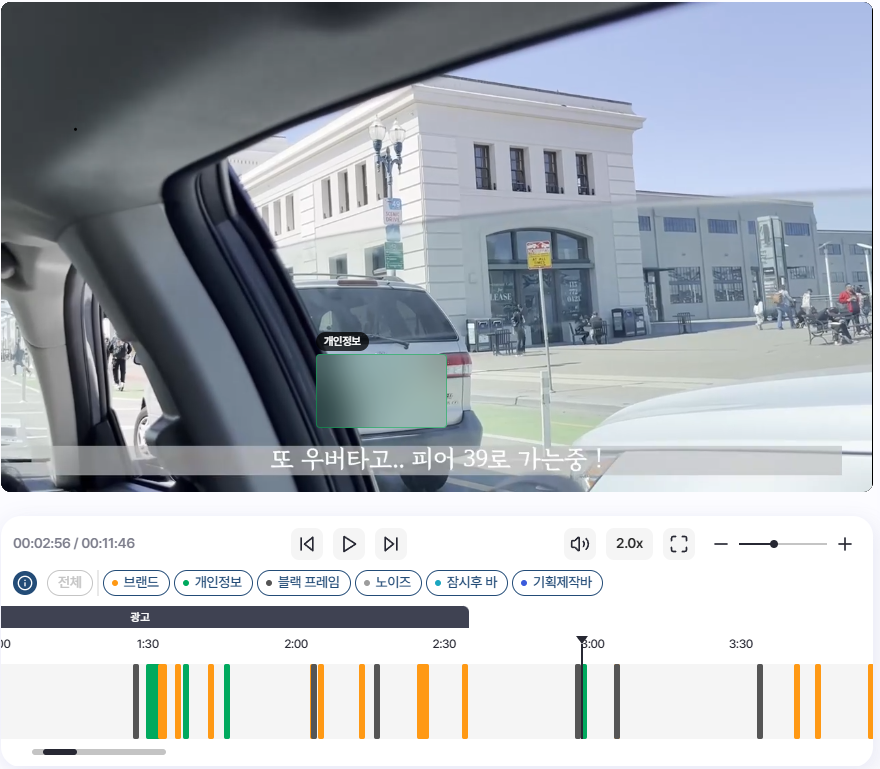
Inside the interface, you can easily adjust mask size, feathering, and opacity, or select specific regions to customize your blur layout.
👉 Want to see exactly how many hours HEIMDEX can shave off your current post-production workflow? → [Request a Free Demo Today]
